Particle Studio Pro
A visual particle effect editor for GDevelop game engine. Design stunning 2D and 3D particle effects with a real-time preview, then export them as JSON files ready to use in your GDevelop projects.
Features
2D & 3D Particle Editors
- Real-time visual editing with immediate feedback
- Separate editors for 2D (PIXI.js) and 3D (Three.js) particles
Particle States System
- Create particles with multiple states: Birth → Intermediate → Death
- Smooth interpolation between states with custom easing
- Control size, color, opacity, speed, rotation, and orbit per state
Emission Modes
- Infinite — continuous emission (rate-based or interval-based)
- Burst (Reservoir) — instant one-shot emission
- One Shot (Reservoir) — gradual emission of a fixed pool
- Flow mode: Rate (particles/sec) or Interval (batch every N seconds)
Emission Zones
- Multiple zone shapes: Circle, Rectangle, Line (2D) / Sphere, Box, Line (3D)
- Surface, Edge, or Volume emission modes
3D-Specific Features
- Billboard rendering for sprite-facing camera
- Per-axis rotation (X/Y/Z) with speed or interpolation mode
- Align-to-velocity for directional particles
- Orbit movement on all 3 axes
- Custom 3D model support for particle shapes
Export & Integration
- Export particle configurations as JSON
- Custom GDevelop extension included (Avanced Particle Emitter)
- Runtime control via GDevelop events: modify states, flow, emission, gravity, and more at runtime
Other
- Custom shape support (images/sprites for 2D, models for 3D)
- Atlas packing for efficient rendering
- Propagation cone with direction and spread control
- Gravity simulation
- Blending modes (Normal, Additive, Multiply)
- Speed, size, and opacity multipliers
How the States System Works
Every particle in Particle Studio Pro follows a lifecycle defined by a chain of states, from the moment it spawns to the moment it disappears.
At its core, the timeline always starts with Birth and ends with Death. Between them, you can insert as many intermediate states as you need — each with its own label and duration (in seconds).
Birth defines everything about a particle when it first appears: its size, color, opacity, speed, and rotation. It is always fully declared and serves as the baseline for all properties.
Death defines the final state of the particle before it vanishes. Speed is not redeclared here — it naturally carries over from the previous state.
Intermediate states are deliberately minimal by default. Only the label and duration are set. Every other property — size, color, opacity, speed, rotation — is opt-in. You add only what you want to change.
Sparse Keyframe Interpolation
This is where the system becomes powerful.
Each property interpolates independently through its own keyframe chain, built only from the states that explicitly declare it.
Example:
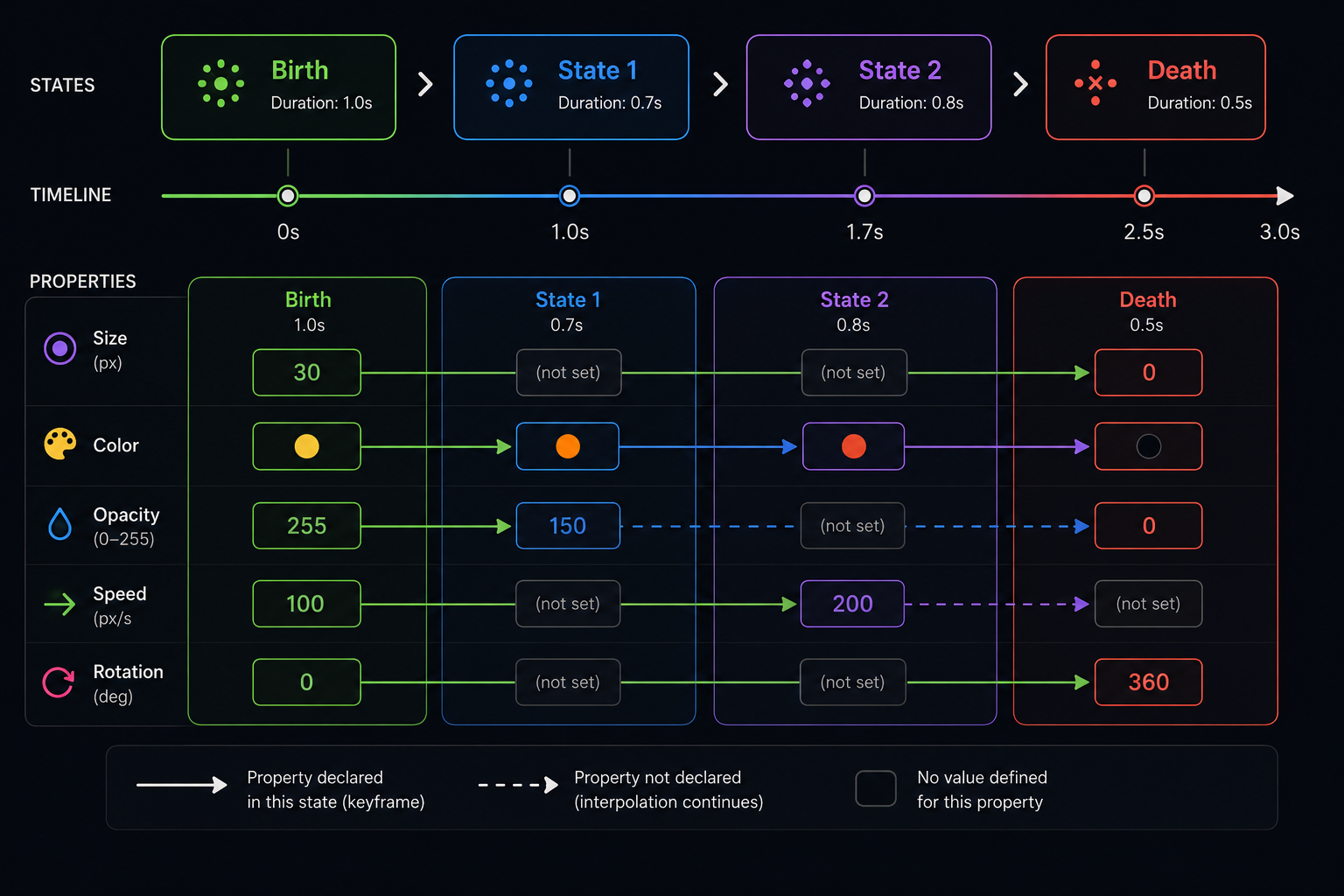
This means intermediate states act as selective control points — they only affect the properties you explicitly add to them, leaving everything else on its natural trajectory.
Duration & Timeline
Each state's duration carves up the particle's total lifetime. Even if an intermediate state declares nothing, its duration still matters — it shifts the timing of when the next state's keyframes are reached.
Each state also supports a custom easing (Linear, Ease In, Ease Out, Ease In-Out) that controls how smoothly the transition into that state is animated.
Extension — Avanced Particle Emitter
The extension is included with Particle Studio Pro. It adds two custom objects to GDevelop:
- AvancedParticleEmitter 2D — for 2D layers
- AvancedParticleEmitter 3D — for 3D layers
Add the object to your scene, point the ParticleJSON property to your exported file, and the effect plays automatically. No code required.
What you can control
Via object properties — without touching the JSON:
- Emission mode, flow, interval, max particles
- Direction, spread, gravity, speed / size / opacity multipliers
- Render modes, billboard, visual debug guides (zone & cone)
Via GDevelop events — at runtime:
- Change emission mode mid-game
- Dynamically adjust flow, direction, and gravity
- Control individual states: color, size, opacity, speed, rotation, orbit
- Read current values as expressions for conditional logic
- Trigger a reset to restart the effect
Discord
Download
Comments
Log in with itch.io to leave a comment.
This is peak